The template offers a complete setup for tracking Facebook ad conversions through both web and server-side methods. It includes configurations for the Facebook Pixel, event tracking, and data layer variables to ensure accurate measurement even under modern privacy restrictions.
By combining browser and server tracking, it improves ad performance and compliance with privacy regulations — effectively bypassing ad blockers and cookie limitations. This dual setup ensures a more reliable data flow and better attribution for conversions.
Important: Make sure to adapt the data layer values to match the keys used on your website, and replace the placeholders with your actual Pixel ID and Meta access token.
GTM web container template
FB CAPI - Web.json (365.7 KB)
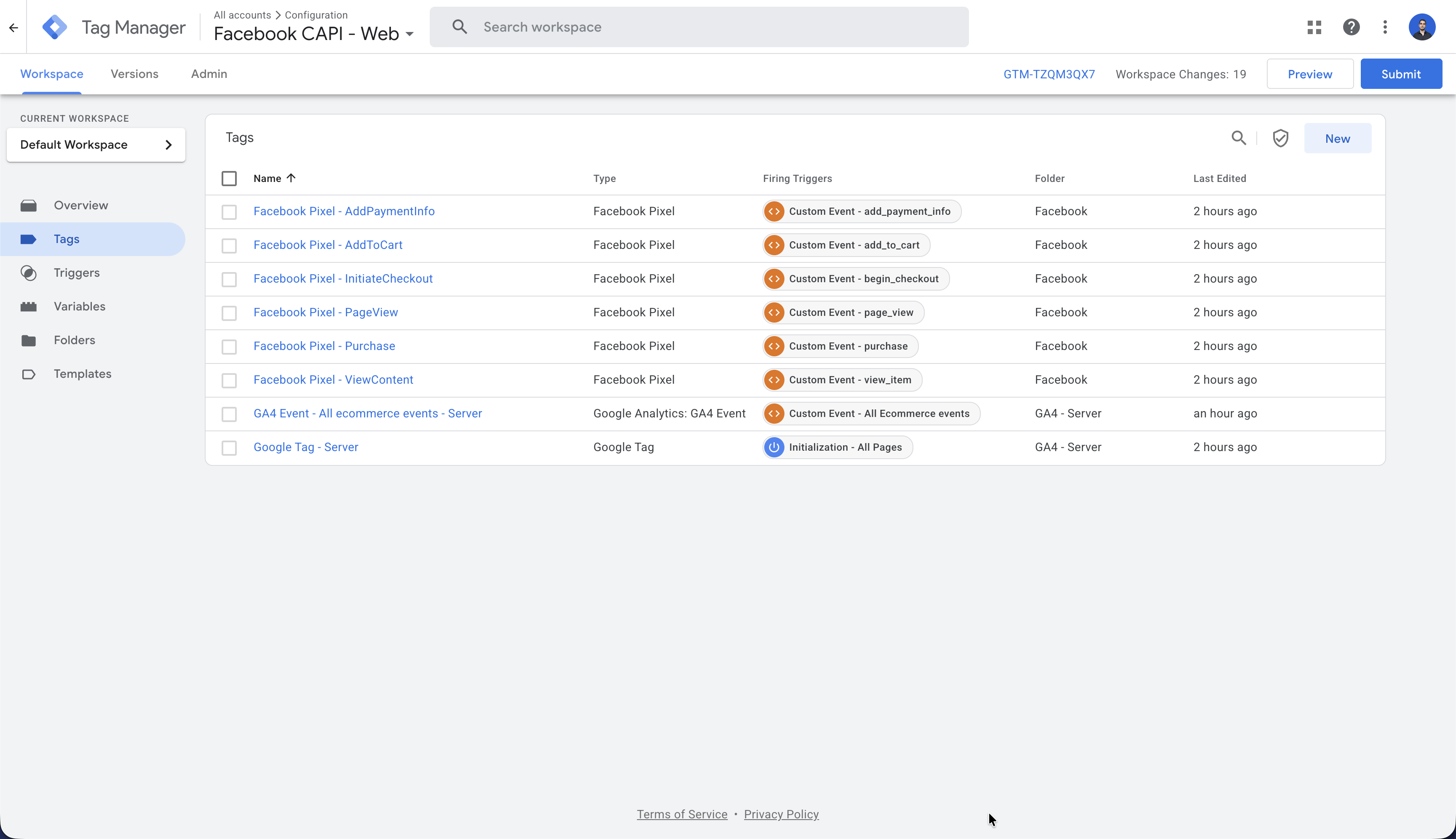
The GTM web container is the foundation of your Facebook tracking setup. This JSON file contains the configuration for:
- Facebook Pixel base code: Initializes the Facebook Pixel on your website to track user interactions
- Event tracking tags: Pre-configured tags for standard events like PageView, Purchase, Lead, and AddToCart
- Data layer variables: Captures important conversion data such as transaction values, product IDs, and customer information
- Triggers: Defines when specific tracking events should fire based on user actions
To implement, simply import this JSON file into your Google Tag Manager web container and configure it with your Facebook Pixel ID.
GTM server container template
FB CAPI - Server.json (236.2 KB)
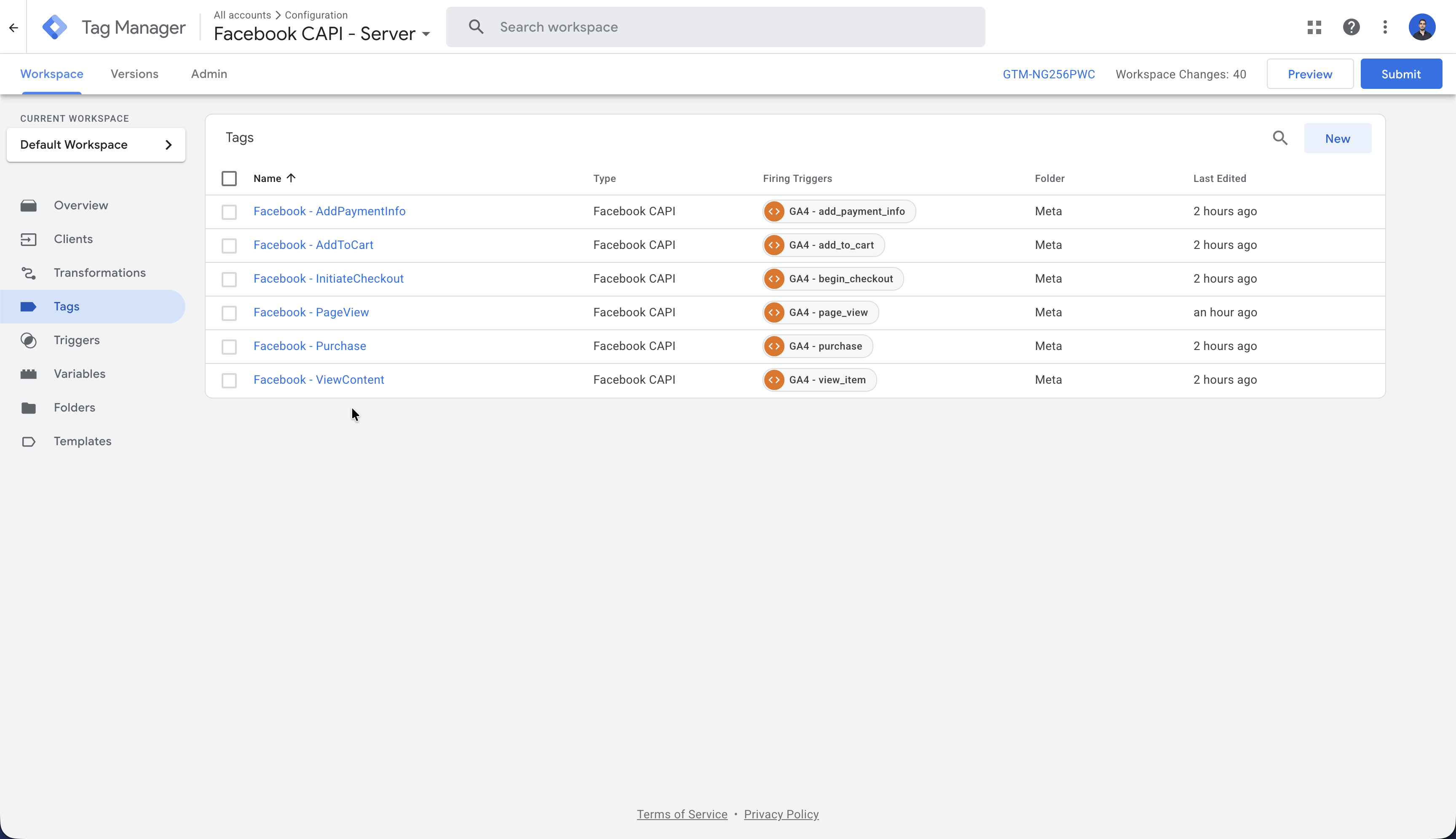
The GTM server container works in conjunction with the web container to provide server-side tracking capabilities. This JSON file contains the configuration for:
- Server-side Facebook CAPI tag: Processes events sent from your web container and forwards them to Facebook’s servers
- Event data transformation: Converts browser-side data into the format required by Facebook’s Conversion API
- Enhanced privacy protection: Sends conversion data from your server, bypassing browser-based ad blockers and privacy restrictions
To implement, import this JSON file into your Google Tag Manager server container and configure it with your Facebook Access Token and server endpoint URL.
What this template does
The Facebook Conversion API (CAPI) GTM Template provides a comprehensive solution for tracking user interactions and conversions on your website and sending this data directly to Facebook, both through the browser (Web) and server-side (Server) methods. This dual-implementation approach helps maintain accurate conversion tracking while respecting user privacy preferences.
When to use it
- When you need to track Facebook ad conversions more reliably in a high-privacy environment (ie, your own domain)
- When browser ad blockers or ITP (Intelligent Tracking Prevention) are affecting your Facebook Pixel data quality
- When you want to implement server-side tracking for more sensitive conversion events
- When you need to comply with privacy regulations while still maintaining accurate measurement
- When you want to improve your Facebook ad performance through better attribution data
How it works
The Web template collects user interaction data directly from the browser using the Facebook Pixel.
The Server template processes the same events but sends data from your server to Facebook’s servers.
Both templates capture standard events (page views, purchases, leads, etc.) and match them to users through various identifiers.
The server-side implementation provides a more reliable data flow that isn’t affected by ad blockers or cookie limitations.
Google Tag Manager orchestrates when and how these tracking methods are triggered based on your configuration.
Data flows to Facebook’s systems where it’s used to optimize ad campaigns and build audience segments.
Key settings
- Facebook Pixel ID: Your unique tracking code identifier
- Access Token: Authentication credential for server-side API calls
- Standard Events: Predefined conversion actions (Purchase, Lead, AddToCart, etc.)
- Event Parameters: Additional data about each conversion (value, currency, content type)
- Advanced Matching Parameters: User identifiers like email, phone, or address for better tracking
- Test Event Code: Option to test implementation without affecting ad campaigns
- Automatic Advanced Matching: Toggle for enabling automatic user data collection
Example scenario
A direct-to-consumer e-commerce brand is experiencing declining performance from their Facebook ads due to iOS privacy changes. By implementing this dual CAPI template, they track purchases both through the browser and their servers. When a customer with an ad blocker makes a $120 purchase, the web pixel might be blocked, but the server-side implementation still accurately attributes this conversion to the correct Facebook ad campaign, improving their ROAS (Return on Ad Spend) reporting.
Why it matters
This template directly addresses one of digital marketing’s biggest current challenges: maintaining accurate conversion tracking in an increasingly privacy-conscious digital landscape. By implementing both client and server-side tracking, marketers can preserve their ability to optimize campaigns effectively while respecting user privacy choices and adapting to platform changes from Apple, Google, and others.